
Integrating a large customer base into a new Job Management Software can be a tedious and error-prone process. However, that is not the case with Servis' Bulk Customer Import functionality.
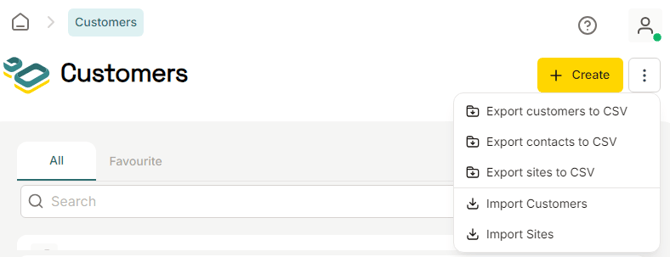
As an administrator, you can easily import/create a large customer base by navigating to the Customers module, selecting the Ellipsis Button, and choosing the Import Customers, option.
This will redirect you to our import portal, where .csv files can be imported.
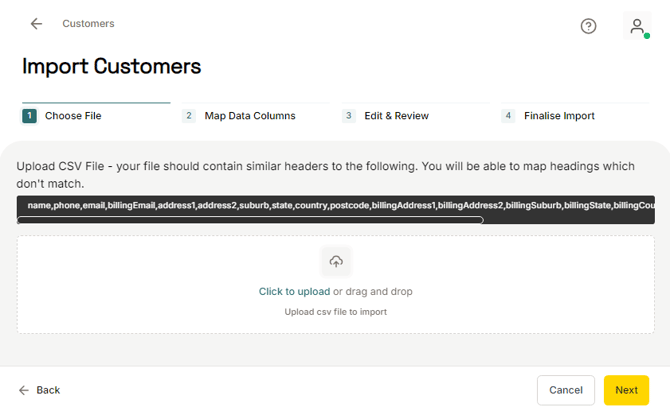
To facilitate the import process, ensure your .csv file contains all your customer information in separate columns. The following data fields are supported by the Servis Customer Import portal:
| Data field | Example | |
| Name | John Doe | |
| Phone | +61 4 1234 5678 | |
| john.doe@example.com | ||
| Billing Email | billing@example.com | |
| Address 1 | 123 George Street | |
| Address 2 | Unit 4B | |
| Suburb | Sydney | |
| State | New South Wales | |
| Country | Australia | |
| Postcode | 2000 | |
| Billing Address 1 | 456 Collins Street | |
| Billing Address 2 | Suite 101 | |
| Billing Suburb | Melbourne | |
| Billing State | Victoria | |
| Billing Country | Australia | |
| Billing Postcode | 3000 | |
| Is Company | Yes | |
| ABN | 12 345 678 901 | |
| Time Zone Region | Australia/Sydney |